v-orm框架是在mybatis之上,做了定制化封装,无需更多使用配置,遵照DDD领域驱动设计。较之于mybatisplus更易用,更简洁,可分钟级别自动代码生成controller、service、vo、dto、entity等,以及elementui的页面,简化开发流程。学习和使用成本更低。核心功能:
V-ORM使用教程使用参考:v-orm-spring-boot-demo
引入starter
/groupIdartifactIdv-orm-spring-boot-starter/artifactIdversionXXXX-RELEASE/version/depency
;;;;;;;;;;;;;importlombok.*;@Getter@Setter@NoArgsConstructor@AllArgsConstructor@Builder@Entity@Type(label="用户")@Table(value="tmp_user")@QueryModel(name="TestQueryModel")@ServiceClass(name="TestService")@ControllerClass(path="api/user",desc="用户接口",name="TestController")@ElementClass@ViewObject(groups={_VO,_DTO})publicclassTestEntityextsIdEntity{protectedstaticfinalStringSIMPLE_VO="TestVo";protectedstaticfinalStringSIMPLE_DTO="TestDto";@Field(label="姓名")@Query(value={,})@View(groups={SIMPLE_VO,SIMPLE_DTO})privateStringusername;@Field(label="jobId")@Query({,})@View(groups={SIMPLE_VO})privateLongjobId;@Field(label="年龄")@Query({,})@View(groups={SIMPLE_VO})privateIntegerage;@Field(label="地址")@Query({,})@View(groups={SIMPLE_VO})privateStringaddress;}@Table:生成具体数据库表名称
@QueryModel:生成对应的查询对象
@ServiceClass:生成对应的Sercvice类
@ControllerClass:生成对应的Controller类
@ElementClass生成对应的Elementui页面
@ViewObject:生成对应的DTO,VO
@Field:生成对应数据库的注释@Query:是指定字段的查询条件@View:是字段在不在DTO,VO里生成
编写生成工具代码
;;;*;;/***@author:liwei*@date:2021/03/0621:50*/publicclassGeneratorTest{publicstaticvoidmain(String[]args){Configconfig=newConfig();//使用lombok注解(true);//生成日志路径(((""),"").toString());//数据库连接信息,不反向生成数据库表则无需配置("jdbc:mysql://localhost:3306/v-orm-demo?useUnicode=true");("root");("root");//实体类的包路径,该包下所有符合条件的实体类都将自动生成代码("");//(可选项)具体实体类的名称,如果配置了,则只生成指定类的数据(());//生成查询类的包路径("");//生成VO类的包路径("");//生成Service类的包路径("");//生成Controller类的包路径("");//生成vue页面的路径("/Users/vince/myproject/v-boot/vue");("/Users/vince/myproject/v-boot/vue");//具体生成调用方法(config,newVoHandler()//生成VO对象,newQueryModelHandler()//生成查询类,newServiceHandler()//生成Service类,newControllerHandler()//生成Controller类,newElementHandler()//生成Element文件,newMysqlHandler(true)//生成数据库表);}}编写好后执行main方法,即可生成对应代码。
代码展示controller:提供基础的增、删、改、查
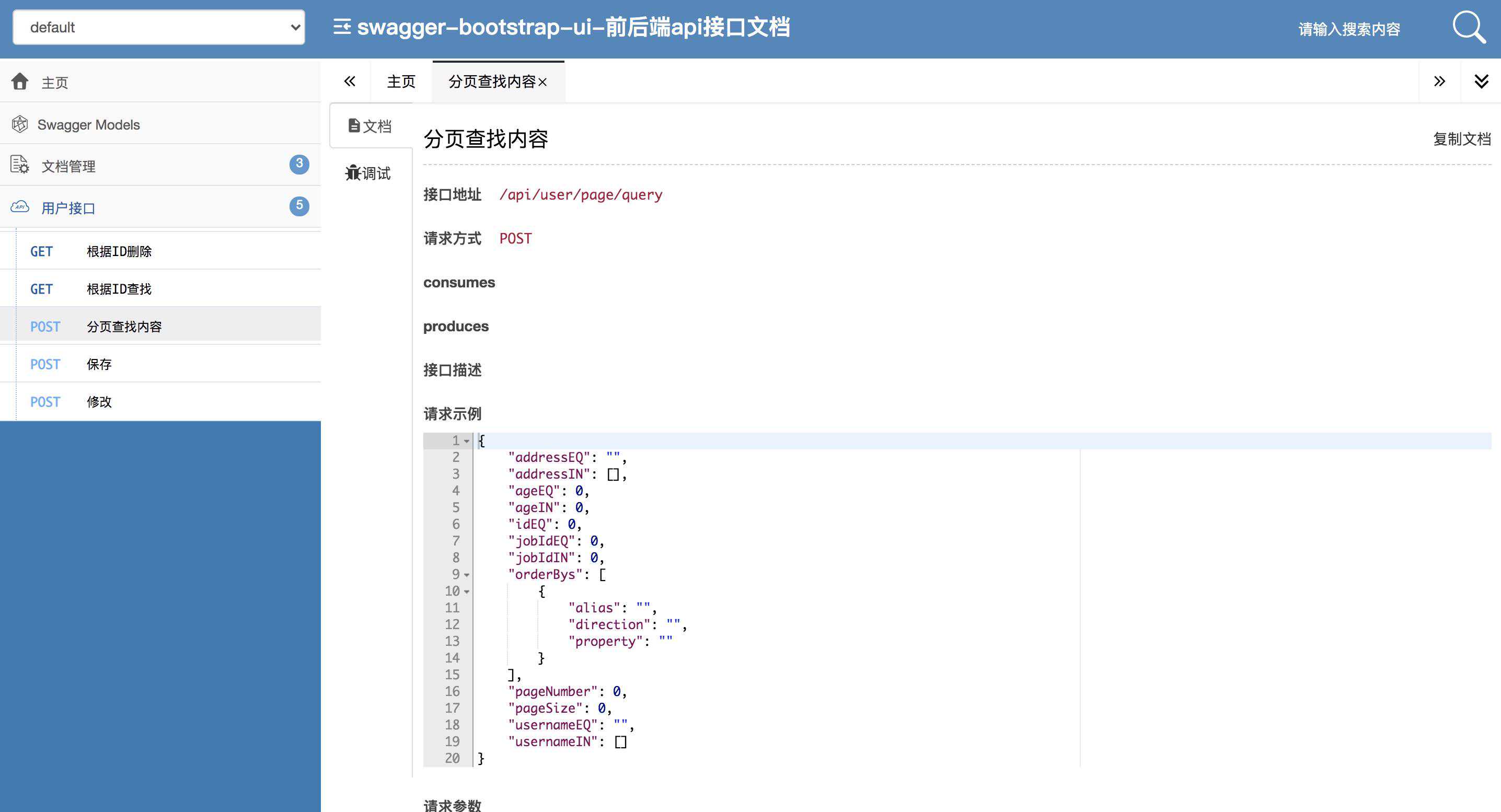
@Slf4j@RestController@RequestMapping("api/user")@Api(tags="用户接口",description="用户接口")publicclassTestController{@AutowiredprivateTestServicetestService;@GetMapping("/info/{id}")@ApiOperation(value="根据ID查找",httpMethod="GET")publicRespTestVogetById(@PathVariablelongid){TestEntityresult=(id);if(result!=null){TestVotestEntityVo=(result);(testEntityVo);}(_NOT_EXIST,"id:"+id);}@PostMapping("/page/query")@ApiOperation(value="分页查找内容",httpMethod="POST")publicRespPageTestVopageQuery(@RequestBodyTestQueryModelqueryModel){PageTestEntityresult=(queryModel);PageTestVovoPage=(result,TestVo::convert2TestVo);(voPage);}@PostMapping("/save")@ApiOperation(value="保存",httpMethod="POST")publicRespTestVosave(@Valid@RequestBodyTestDtotestEntityDto){TestEntityentity=();intresult=(entity);if(result0){TestVotestEntityVo=(entity);(testEntityVo);}(,"保存数据失败");}@PostMapping("/update")@ApiOperation(value="修改",httpMethod="POST")publicRespupdate(@Valid@RequestBodyTestDtotestEntityDto){TestEntityentity=();intresult=(entity);if(result0){();}(,"修改数据失败");}@GetMapping("/delete/{id}")@ApiOperation(value="根据ID删除",httpMethod="GET")publicRespdelete(@PathVariablelongid){intresult=(id);if(result0){();}(,"删除数据失败");}}service:很简洁,继承BaseService方法即可。
@Service@Slf4jpublicclassTestServiceextsBaseServiceTestEntity{}VO、DTO:类似基本的属性都已经生成好,还提供了基础的类型转换方法。
@Getter@Setter@Builder@NoArgsConstructor@AllArgsConstructor@ApiModel(value="TestDto",description="TestDto")publicclassTestDtoimplementsSerializable{@ApiModelProperty(value="id")privateLongid;@ApiModelProperty(value="姓名")privateStringusername;/*扩展*//*转换*/publicTestEntityconvert2TestEntity(){TestDtoConvertconvert=newTestDtoConvert();TestEntitytarget=(this);returntarget;}privatestaticclassTestDtoConvertextsConverterTestDto,TestEntity{@OverrideprotectedTestEntitydoForward(TestDtosource){TestEntitytarget=newTestEntity();(target,source);returntarget;}@OverrideprotectedTestDtodoBackward(TestEntitysource){thrownewAssertionError("不支持逆向转化方法!");}}}QueryModel:设置的查询方法都已经自动生成
@Getter@Setter@Builder@NoArgsConstructor@AllArgsConstructor@ApiModel(value="TestQueryModel",description="TestQueryModel")publicclassTestQueryModelextsQueryModelimplementsSerializable{privateLongidEQ;@ApiModelProperty(value="姓名")privateStringusernameEQ;@ApiModelProperty(value="姓名")privateListStringusernameIN;@ApiModelProperty(value="jobId",example="0")privateLongjobIdEQ;@ApiModelProperty(value="jobId",example="0")privateListLongjobIdIN;@ApiModelProperty(value="年龄",example="0")privateIntegerageEQ;@ApiModelProperty(value="年龄",example="0")privateListIntegerageIN;@ApiModelProperty(value="地址")privateStringaddressEQ;@ApiModelProperty(value="地址")privateListStringaddressIN;}项目启动需要在SpringBoot启动类上加上:因为这里存在基础的bean的自动适配。
@SpringBootApplication(scanBasePackages={"",""})publicclassVOrmSpringBootDemoApplication{publicstaticvoidmain(String[]args){(,args);}}项目配置:和普通的mybatis配置没有任何不同
==jdbc:mysql://localhost:3306/v-orm-demo?useUnicode=truecharacterEncoding=utf-8serverTimezone=GMT%2==root#如果自动开启swagger的话,路径写到自己的项目名=
启动效果掩饰
查看swagger接口文档:ip:port/